Striped Shirt Traveller Walking Through Teal Mist
About this prompt
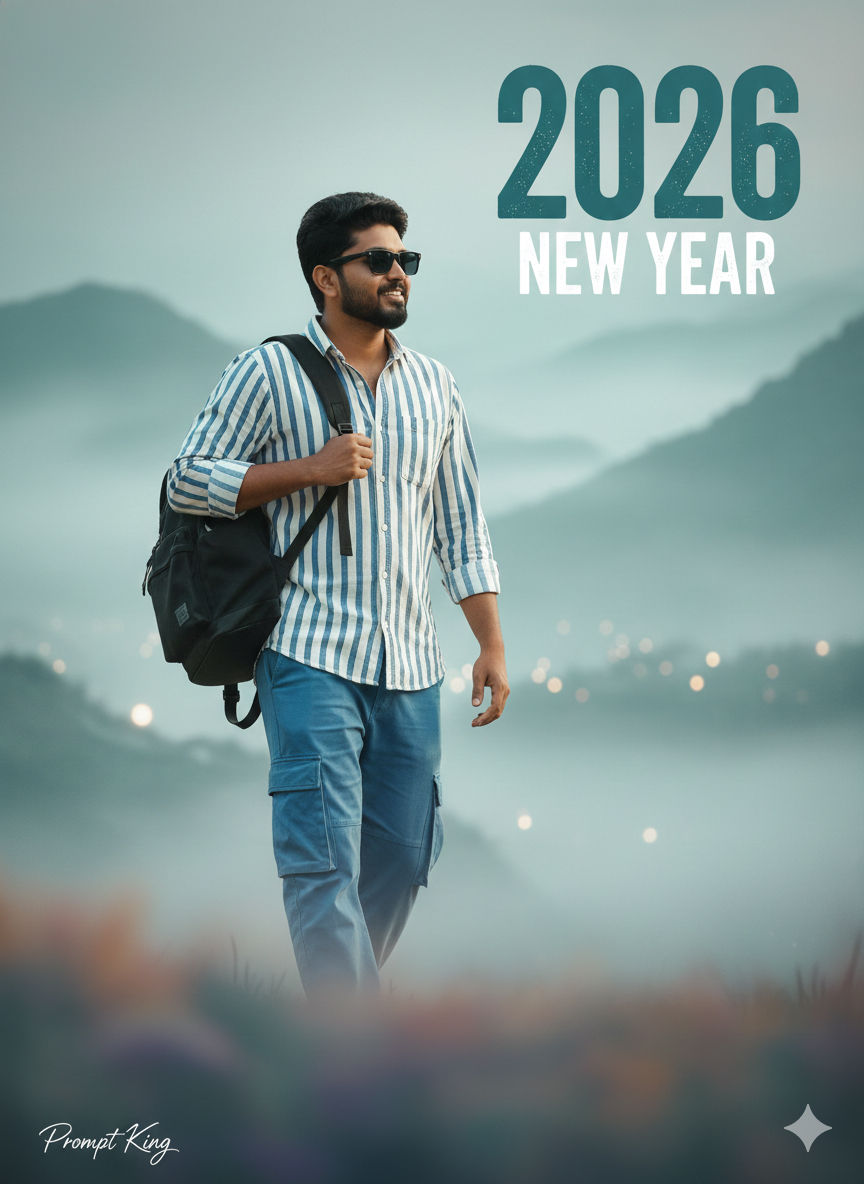
A photorealistic, cinematic new year shot of a young Indian man walking confidently from left to right across a softly blurred foreground. He wears sunglasses, a white and blue striped button-down shirt and blue cargo pants, and carries a black backpack in his left hand. The background is a misty, ethereal landscape in muted teal, blue and light grey, giving the scene a calm, almost dreamlike quality. A large, bold, slightly distressed teal '2026' text overlay sits in the frame, turning the photo into a poster. The lighting is cinematic and the details sharp, while the side-on walking pose suggests forward movement and fresh momentum. Note that the original text mixes pronouns, so it is worth editing the prompt to match the subject in your uploaded photo for consistent results. It suits new year greetings, a resolutions post, a travel creator's first upload of the year, or a motivational status about moving forward. The text overlay can also be changed to a personal phrase, a milestone or a different year, and the outfit can be swapped for your own clothing to keep the image authentic.
Lighting, colour and composition
Soft, diffused cinematic light keeps contrast low and the mood calm. The palette is muted teal, slate blue and light grey, with the blue-white stripes and black backpack providing gentle contrast. A side-profile walking figure crosses the frame horizontally, with large typography adding a strong graphic layer behind.
Ways to make it your own
- Edit the pronouns in the prompt to match your photo so the subject stays consistent.
- Change the striped shirt to a solid linen shirt for a cleaner, more minimal look.
- Use a 16:9 frame to emphasise the left-to-right walk for a banner or thumbnail.
Best for
Trending photo ideas and creative portrait inspiration.
Suggested framing
Use 9:16 portrait framing as described in the prompt, or adapt to 4:5 for feed posts.
Customization ideas
Adjust the clothing, background, lighting, colors and composition to match your own idea.
How to use
Copy the prompt, adapt it to your idea, and paste it into your preferred compatible AI tool. Follow that tool’s instructions for reference photos.
A few helpful answers.
What type of image does this prompt create?
In a compatible AI tool, this prompt is intended as a starting point for a photorealistic, cinematic new year shot of a young Indian man walking confidently from left to right across a softly blurred foreground. He wears sunglasses, a white and blue striped button-down shirt and blue cargo pants, and carries a black backpack in his left hand. The background is a misty, ethereal landscape in muted teal, blue and light grey, giving the scene a calm, almost dreamlike quality. A large, bold, slightly distressed teal '2026' text overlay sits in the frame, turning the photo into a poster. The lighting is cinematic and the details sharp, while the side-on walking pose suggests forward movement and fresh momentum. Note that the original text mixes pronouns, so it is worth editing the prompt to match the subject in your uploaded photo for consistent results. It suits new year greetings, a resolutions post, a travel creator's first upload of the year, or a motivational status about moving forward. The text overlay can also be changed to a personal phrase, a milestone or a different year, and the outfit can be swapped for your own clothing to keep the image authentic. Results depend on the tool, settings and references you use.
Can I customize the clothing or background?
Yes. Replace the clothing, setting or colors in the prompt with your own choices. Keep descriptions consistent and adjust one detail at a time.
What aspect ratio works best?
Start with Use 9:16 portrait framing as described in the prompt, or adapt to 4:5 for feed posts.. A 4:5 ratio works well for a portrait feed post. Adjust the crop for your intended platform and your tool’s available settings.
Does Prompt King generate the image?
No. Prompt King helps users discover and copy prompts that can be used with compatible AI tools.
Can I use this for social media ideas?
Yes. Use it as creative inspiration and customize the result for your audience. Use photos you have permission to upload, and check your chosen tool’s terms before publishing.