South Indian Red Silk Saree With Polki Jewellery
About this prompt
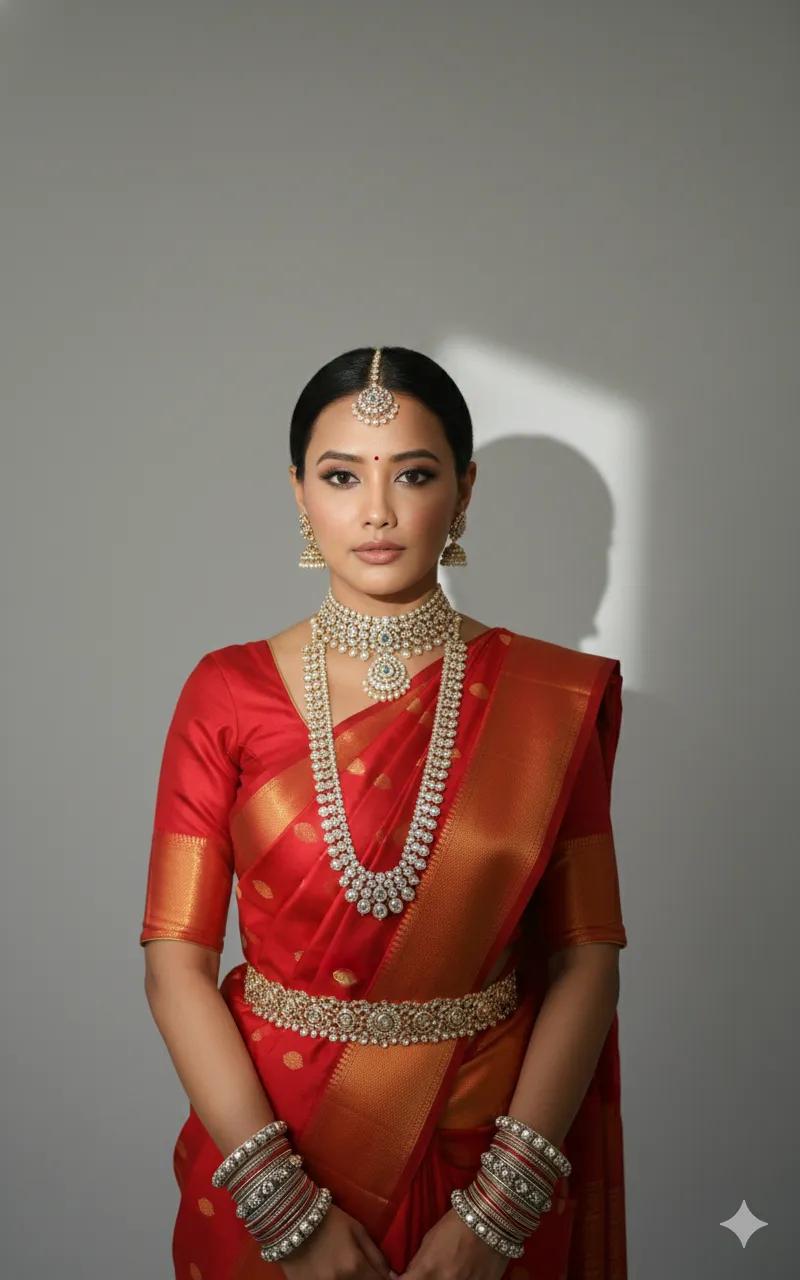
This bridal style prompt produces a close-up studio portrait of a South Indian woman dressed in a bright red silk saree with a thin gold border. The look centres on heavy uncut diamond jewellery in the Polki and Kundan tradition, including a thick choker and a long rani haar that drapes down the front of the saree. An ornate oxidised silver kamarbandh sits at the waist, adding a contrasting metal tone to the gold and diamond pieces. A maang tikka rests along the hair parting, and several heavy bangles fill the wrists. The subject stands against a plain light grey wall, and dramatic side lighting creates a sharp shadow line across the background, giving the image a clean, editorial feel. The prompt asks for studio-quality, high-resolution output with sharp focus, so jewellery textures and silk weave remain clearly defined. It works well for bridal inspiration, wedding season profile pictures, or previewing a traditional jewellery look before an event. Upload a clear, front-facing photo with even lighting for the most accurate result, and choose an image where your neck and shoulders are visible so the necklace and choker sit naturally in the final portrait.
Lighting, colour and composition
Hard directional side light carves a crisp shadow line on a plain light grey wall. Saturated red silk and gold borders contrast with the cool sparkle of uncut diamonds and oxidised silver. Tight framing and sharp focus keep the choker, rani haar and bangles detailed, giving a clean editorial studio finish.
Ways to make it your own
- Choose a reference photo showing your neck and shoulders so the choker and long necklace sit naturally.
- Request softer side lighting if the shadow line feels too harsh across the face.
- Swap the saree colour in the prompt to match a planned wedding outfit while keeping the jewellery set.
Best for
South India photo ideas and creative portrait inspiration.
Suggested framing
Use 9:16 portrait framing as described in the prompt, or adapt to 4:5 for feed posts.
Customization ideas
Adjust the clothing, background, lighting, colors and composition to match your own idea.
How to use
Copy the prompt, adapt it to your idea, and paste it into your preferred compatible AI tool. Follow that tool’s instructions for reference photos.
A few helpful answers.
What type of image does this prompt create?
In a compatible AI tool, this prompt is intended as a starting point for this bridal style prompt produces a close-up studio portrait of a South Indian woman dressed in a bright red silk saree with a thin gold border. The look centres on heavy uncut diamond jewellery in the Polki and Kundan tradition, including a thick choker and a long rani haar that drapes down the front of the saree. An ornate oxidised silver kamarbandh sits at the waist, adding a contrasting metal tone to the gold and diamond pieces. A maang tikka rests along the hair parting, and several heavy bangles fill the wrists. The subject stands against a plain light grey wall, and dramatic side lighting creates a sharp shadow line across the background, giving the image a clean, editorial feel. The prompt asks for studio-quality, high-resolution output with sharp focus, so jewellery textures and silk weave remain clearly defined. It works well for bridal inspiration, wedding season profile pictures, or previewing a traditional jewellery look before an event. Upload a clear, front-facing photo with even lighting for the most accurate result, and choose an image where your neck and shoulders are visible so the necklace and choker sit naturally in the final portrait. Results depend on the tool, settings and references you use.
Can I customize the clothing or background?
Yes. Replace the clothing, setting or colors in the prompt with your own choices. Keep descriptions consistent and adjust one detail at a time.
What aspect ratio works best?
Start with Use 9:16 portrait framing as described in the prompt, or adapt to 4:5 for feed posts.. A 4:5 ratio works well for a portrait feed post. Adjust the crop for your intended platform and your tool’s available settings.
Does Prompt King generate the image?
No. Prompt King helps users discover and copy prompts that can be used with compatible AI tools.
Can I use this for social media ideas?
Yes. Use it as creative inspiration and customize the result for your audience. Use photos you have permission to upload, and check your chosen tool’s terms before publishing.