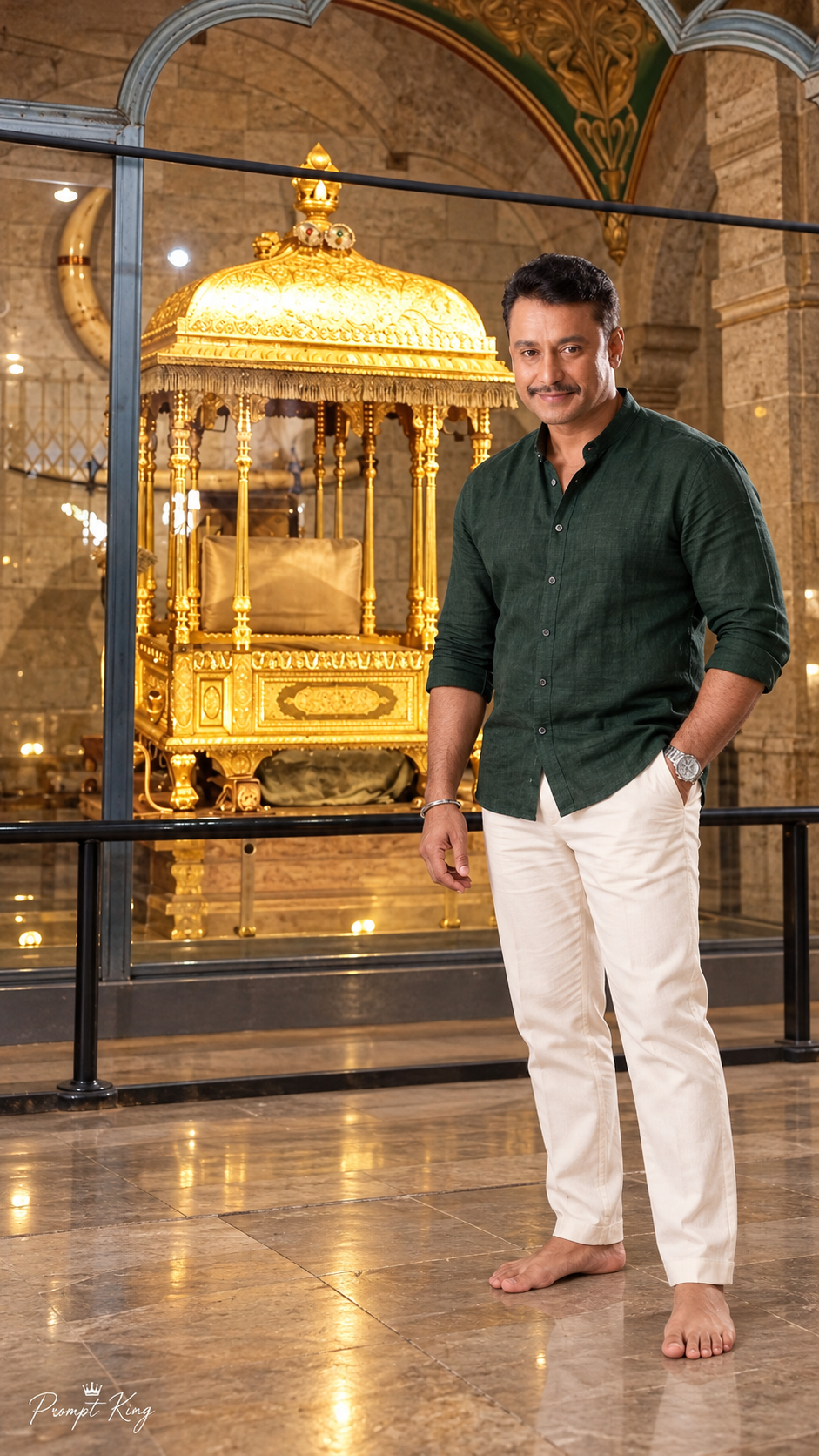
Create a breathtaking, ultra-photorealistic, premium cinematic **9:16 vertical full-body portrait in 8K-quality detail**, featuring a stylish Indian man standing confidently in front of the magnificent **Golden Ambari (Royal Golden Howdah) displayed inside Mysore Palace, Karnataka, India**.
The final image must look like a genuine professional photograph captured inside the real Mysore Palace, with authentic architecture, museum lighting, realistic human proportions, and exquisite royal golden details.
### 1. UPLOADED REFERENCE IMAGES — EXTREMELY IMPORTANT
**REFERENCE IMAGE A — ORIGINAL GOLDEN AMBARI PHOTO**
The user has uploaded an ORIGINAL REAL PHOTOGRAPH of the Golden Ambari displayed inside Mysore Palace.
Use this uploaded image as the PRIMARY and STRICT architectural, cultural, and environmental reference.
Carefully preserve the original Golden Ambari's appearance:
- Magnificent gold-plated royal Ambari with a large, beautifully carved dome-shaped canopy.
- Detailed traditional golden floral engravings covering the canopy.
- Small golden ornamental finial at the top.
- Intricately carved golden supporting pillars.
- Hanging golden ornamental fringes around the canopy.
- Beautiful rectangular royal seating platform.
- Original cream-beige seat cushion inside the Ambari.
- Elaborate golden carved panels decorating the base.
- Authentic traditional craftsmanship and realistic metallic gold reflections.
- Original palace stone-wall background with heritage arches.
- Carved floral decorations visible along the upper architectural arches.
- Warm museum-style illumination highlighting the golden structure.
**CRITICAL REFERENCE RULE:**
The Golden Ambari must look as close as possible to the EXACT Golden Ambari shown in the uploaded photograph.
Do not replace it with an imaginary golden throne, temple, elephant howdah, wedding mandap, or another royal structure.
Preserve the actual proportions, canopy shape, supporting pillars, seating arrangement, and intricate craftsmanship.
Keep the Golden Ambari completely visible and recognizable.
Do not add an elephant, goddess idol, or additional decorations that are not present in the reference photograph.
**REFERENCE IMAGE B — MAN'S ORIGINAL FACE PHOTOGRAPH**
The user will also upload the man's original portrait photograph.
Use this photograph as the PRIMARY and ONLY facial identity reference.
Strictly preserve his original:
- Exact recognizable facial identity.
- Natural face shape and facial proportions.
- Eyes, eyebrows, nose, lips, and jawline.
- Original moustache and facial hair.
- Natural hairstyle, hairline, and hair texture.
- Natural skin tone and realistic skin texture.
- Authentic facial expression without artificial beautification.
The generated man must look like the SAME individual shown in the uploaded facial reference.
Do not change, redesign, replace, or beautify his face.
### 2. NEW PREMIUM AESTHETIC OUTFIT
Dress the man in a sophisticated modern Indian luxury-casual outfit, completely different from the previous maroon kurta, Nehru jacket, navy blazer, and olive-green denim jacket looks.
**Outfit details:**
- Premium dark emerald-green textured linen shirt.
- Elegant band collar with a clean, minimal button placket.
- Long sleeves neatly folded just below the elbows.
- Natural premium linen texture with subtle fabric creases.
- Stylish ivory-white straight-fit tailored trousers.
- Premium silver stainless-steel wristwatch.
- Minimal elegant accessories.
The overall fashion aesthetic should feel luxurious, minimal, mature, stylish, and naturally elegant.
The rich emerald-green shirt must create a beautiful visual contrast against the warm golden Ambari.
### 3. POSE AND BODY POSITION
Position the man standing naturally **in front of the Golden Ambari, slightly toward the RIGHT foreground**, leaving the golden structure clearly visible behind and beside him.
The man must:
- Face directly toward the camera.
- Maintain natural eye contact with the camera.
- Have a subtle, confident smile.
- Stand in a relaxed yet stylish posture.
- Keep one hand casually inside his trouser pocket.
- Let the other hand rest naturally beside his body.
- Maintain relaxed shoulders and realistic posture.
- Show his complete body from head to feet.
Keep his body proportions realistic and naturally balanced.
The man should look like a visitor posing for a beautiful photograph inside Mysore Palace, not a model pasted into a separate background.
### 4. STRICT BAREFOOT RULE
**IMPORTANT: ABSOLUTELY NO FOOTWEAR.**
The man must stand completely barefoot on the palace floor.
Do not generate:
- Shoes
- Sneakers
- Sandals
- Slippers
- Chappals
- Socks
- Any other footwear
Both bare feet must be naturally visible and correctly positioned on the floor.
Preserve realistic toes, feet anatomy, floor contact, and natural shadows.
### 5. GOLDEN AMBARI — MAIN BACKGROUND ATTRACTION
The magnificent Golden Ambari must remain the dominant heritage attraction.
Composition requirements:
- Show the complete golden canopy and crown ornament.
- Show the detailed gold supporting pillars.
- Keep the original cream-beige seating cushion visible.
- Preserve the golden carved rectangular base.
- Maintain the authentic stone arch background.
- Maintain realistic museum lighting.
- Preserve the original display setting and viewing barriers where visible.
- Keep the man on the visitor side of the display barrier, never inside or touching the Ambari.
The Ambari must not appear enlarged, distorted, redesigned, or artificially moved into an unrealistic setting.
Use a natural camera position that keeps both the man and the Ambari visible, minimizing distracting railings without inventing a different display.
### 6. CAMERA AND COMPOSITION
**Aspect Ratio:** STRICT 9:16 Vertical.
**Camera:** Professional full-frame DSLR.
**Lens:** 28mm environmental portrait lens with corrected perspective.
**Photography Style:** Premium aesthetic travel-fashion photography.
**Camera Angle:** Natural eye-level, slightly low perspective.
**Composition:**
- Man standing in the right foreground.
- Golden Ambari clearly visible behind and toward the left-center.
- Complete Ambari canopy visible at the top.
- Full-body man visible, including both bare feet.
- Beautiful heritage palace arches in the background.
- Natural depth and realistic object scale.
- Balanced negative space around the subject.
The Golden Ambari should remain visually impressive, while the man's original face remains sharp and recognizable.
### 7. NATURAL CINEMATIC PALACE LIGHTING
Create realistic indoor palace photography lighting:
- Warm golden illumination reflecting from the Ambari.
- Soft ambient lighting across the stone walls.
- Natural diffused fill light illuminating the man's face.
- Subtle warm highlights across the emerald-green shirt.
- Realistic metallic reflections on the golden canopy.
- Accurate soft floor shadows.
- Balanced exposure without excessive golden glow.
Avoid harsh studio lighting, artificial halos, unrealistic reflections, or overexposed gold surfaces.
The photograph must feel authentic rather than digitally composited.
### 8. ULTRA-REALISTIC IMAGE QUALITY
Ultra-photorealistic, 8K-quality detail, premium professional photography, natural skin pores, detailed original facial features, realistic moustache and hair strands, beautiful linen fabric texture, authentic ivory trouser folds, realistic bare feet, intricate gold engravings, physically accurate lighting, natural shadows, realistic palace architecture, detailed museum atmosphere, and premium cinematic HDR color grading.
The final result should look like a high-end celebrity travel portrait captured on location inside Mysore Palace.
### 9. WATERMARK
Add a small, elegant white handwritten-style **"Prompt King"** signature with a tiny crown symbol in the bottom-left corner.
The signature must be subtle, premium, clearly readable, and non-distracting.
### 10. STRICT NEGATIVE PROMPT
Avoid altered facial identity, incorrect moustache, different hairstyle, artificial skin smoothing, wrong body proportions, shoes, slippers, sandals, socks, distorted bare feet, extra toes, extra fingers, missing limbs, cropped feet, inaccurate Golden Ambari design, imaginary golden throne, elephant, added goddess idol, distorted pillars, incorrect canopy shape, fake museum background, excessive golden glow, artificial CGI appearance, blurred facial details, unnatural pose, excessive depth-of-field blur, incorrect hand anatomy, and oversized watermark.
### FINAL OUTPUT
A breathtaking, hyper-realistic, premium cinematic **9:16 full-body portrait** featuring the original reference man standing barefoot in a stylish dark emerald-green linen shirt and ivory tailored trousers, looking directly toward the camera with a subtle confident smile, positioned naturally in front of the REAL Golden Ambari displayed inside Mysore Palace.
The uploaded Golden Ambari photograph must remain the primary environmental and structural reference, while the uploaded man's portrait must remain the strict facial identity reference.
Preserve the complete intricately carved golden canopy, royal seating structure, original stone arches, authentic indoor palace atmosphere, natural photographic perspective, and subtle **Prompt King** signature.