Personalised Desk Calendar Mock-up With a Man's Portrait
About this prompt
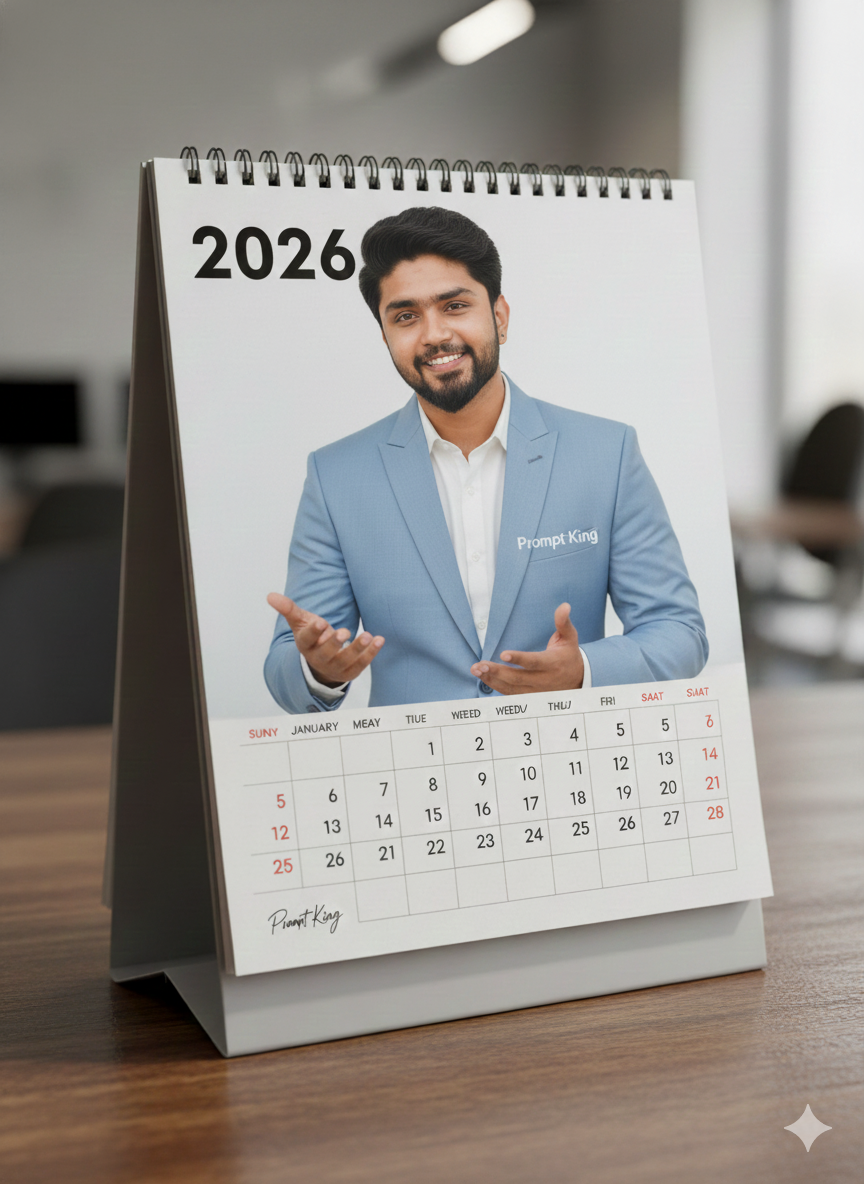
This prompt mirrors the desk calendar concept for a male subject. It produces a realistic vertical desk calendar on a textured wooden table, complete with bold printed '2026' typography at the top, a readable monthly grid, real paper texture and natural shadows. The cover photo shows a man over twenty in an elegant, premium outfit, such as a tailored shirt, blazer or quality T-shirt. Strict instructions keep the face identical to your uploaded reference, including any beard, so that only clothing, hairstyle, pose, expression and hands are allowed to change. His expression is confident and natural with subtle depth, and posture and hands are kept anatomically correct. The scene is styled like cinematic commercial product photography with shallow depth of field, realistic reflections and micro-detail. As written, the prompt prints the 'Prompt King' signature on the clothing and calendar stand, which you can swap for your own name or logo. It works well as a New Year post, a gift mock-up for a partner or father, a promotional idea for a print shop, or a professional-looking image for a freelancer's yearly planner announcement.
Lighting, colour and composition
Gentle daylight from the side creates soft shadows behind the calendar and natural reflections on the wooden surface. The palette is warm walnut and oak, white paper and neutral menswear tones like navy, black and grey. A product-style three-quarter angle with shallow depth of field keeps the calendar crisp and the setting softly blurred.
Ways to make it your own
- Swap the logo text for a family name or business name to personalise the gift.
- Add a coffee cup and plant on the table for a lived-in desk setup.
- Choose a specific outfit, such as a charcoal blazer and white shirt, for consistent results.
Best for
Trending photo ideas and creative portrait inspiration.
Suggested framing
Use 9:16 portrait framing as described in the prompt, or adapt to 4:5 for feed posts.
Customization ideas
Adjust the clothing, background, lighting, colors and composition to match your own idea.
How to use
Copy the prompt, adapt it to your idea, and paste it into your preferred compatible AI tool. Follow that tool’s instructions for reference photos.
A few helpful answers.
What type of image does this prompt create?
In a compatible AI tool, this prompt is intended as a starting point for this prompt mirrors the desk calendar concept for a male subject. It produces a realistic vertical desk calendar on a textured wooden table, complete with bold printed '2026' typography at the top, a readable monthly grid, real paper texture and natural shadows. The cover photo shows a man over twenty in an elegant, premium outfit, such as a tailored shirt, blazer or quality T-shirt. Strict instructions keep the face identical to your uploaded reference, including any beard, so that only clothing, hairstyle, pose, expression and hands are allowed to change. His expression is confident and natural with subtle depth, and posture and hands are kept anatomically correct. The scene is styled like cinematic commercial product photography with shallow depth of field, realistic reflections and micro-detail. As written, the prompt prints the 'Prompt King' signature on the clothing and calendar stand, which you can swap for your own name or logo. It works well as a New Year post, a gift mock-up for a partner or father, a promotional idea for a print shop, or a professional-looking image for a freelancer's yearly planner announcement. Results depend on the tool, settings and references you use.
Can I customize the clothing or background?
Yes. Replace the clothing, setting or colors in the prompt with your own choices. Keep descriptions consistent and adjust one detail at a time.
What aspect ratio works best?
Start with Use 9:16 portrait framing as described in the prompt, or adapt to 4:5 for feed posts.. A 4:5 ratio works well for a portrait feed post. Adjust the crop for your intended platform and your tool’s available settings.
Does Prompt King generate the image?
No. Prompt King helps users discover and copy prompts that can be used with compatible AI tools.
Can I use this for social media ideas?
Yes. Use it as creative inspiration and customize the result for your audience. Use photos you have permission to upload, and check your chosen tool’s terms before publishing.