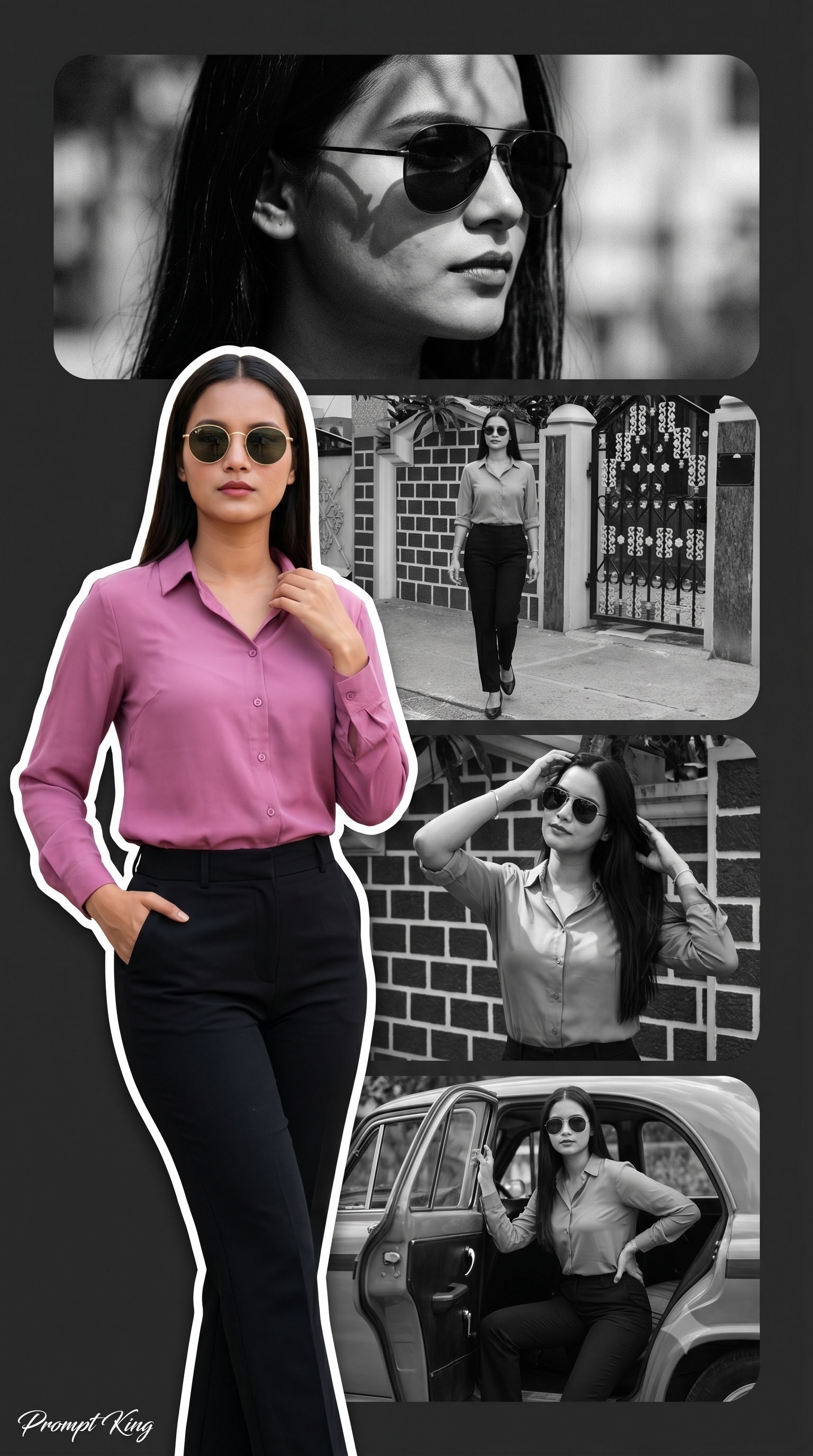
Mauve Shirt Cutout Over Black and White Poster Panels
About this prompt
This prompt creates a vertical poster collage with four stacked horizontal rounded rectangles as the background. Each panel holds a black-and-white cinematic shot of a young woman wearing sunglasses in a different pose, such as looking away, smiling or adjusting her glasses. In the foreground on the left side, a full-colour, high-quality cutout of the same woman stands in a cool, confident pose. She wears a pink mauve shirt with black trousers and sunglasses, a simple and smart outfit that stands out clearly against the monochrome panels behind her. The layout feels like a fashion magazine page or a film poster, with the colour figure acting as the main focus and the background frames adding story and variety. Because the prompt is designed to work with your uploaded image, the face stays consistent across all the shots. It works well for an outfit showcase, an Instagram Story, a college farewell post, a personal brand profile or a phone wallpaper. People who like clean, modern and editorial edits rather than festive or traditional themes will find this layout especially useful.
Lighting, colour and composition
Background panels use rich black-and-white contrast with soft cinematic grain. The foreground figure carries the only colour, mainly mauve pink and black, which keeps attention on her. A left-weighted composition lets the stacked rounded panels remain visible on the right side.
Ways to make it your own
- Try a mustard, olive or sky blue shirt instead of mauve to suit your skin tone.
- Put the colour cutout on the right side if your face looks better from that angle.
- Add your name or a short caption in bold white text across one of the panels.
Best for
Trending photo ideas and creative portrait inspiration.
Suggested framing
Use 9:16 portrait framing as described in the prompt, or adapt to 4:5 for feed posts.
Customization ideas
Adjust the clothing, background, lighting, colors and composition to match your own idea.
How to use
Copy the prompt, adapt it to your idea, and paste it into your preferred compatible AI tool. Follow that tool’s instructions for reference photos.
A few helpful answers.
What type of image does this prompt create?
In a compatible AI tool, this prompt is intended as a starting point for this prompt creates a vertical poster collage with four stacked horizontal rounded rectangles as the background. Each panel holds a black-and-white cinematic shot of a young woman wearing sunglasses in a different pose, such as looking away, smiling or adjusting her glasses. In the foreground on the left side, a full-colour, high-quality cutout of the same woman stands in a cool, confident pose. She wears a pink mauve shirt with black trousers and sunglasses, a simple and smart outfit that stands out clearly against the monochrome panels behind her. The layout feels like a fashion magazine page or a film poster, with the colour figure acting as the main focus and the background frames adding story and variety. Because the prompt is designed to work with your uploaded image, the face stays consistent across all the shots. It works well for an outfit showcase, an Instagram Story, a college farewell post, a personal brand profile or a phone wallpaper. People who like clean, modern and editorial edits rather than festive or traditional themes will find this layout especially useful. Results depend on the tool, settings and references you use.
Can I customize the clothing or background?
Yes. Replace the clothing, setting or colors in the prompt with your own choices. Keep descriptions consistent and adjust one detail at a time.
What aspect ratio works best?
Start with Use 9:16 portrait framing as described in the prompt, or adapt to 4:5 for feed posts.. A 4:5 ratio works well for a portrait feed post. Adjust the crop for your intended platform and your tool’s available settings.
Does Prompt King generate the image?
No. Prompt King helps users discover and copy prompts that can be used with compatible AI tools.
Can I use this for social media ideas?
Yes. Use it as creative inspiration and customize the result for your audience. Use photos you have permission to upload, and check your chosen tool’s terms before publishing.