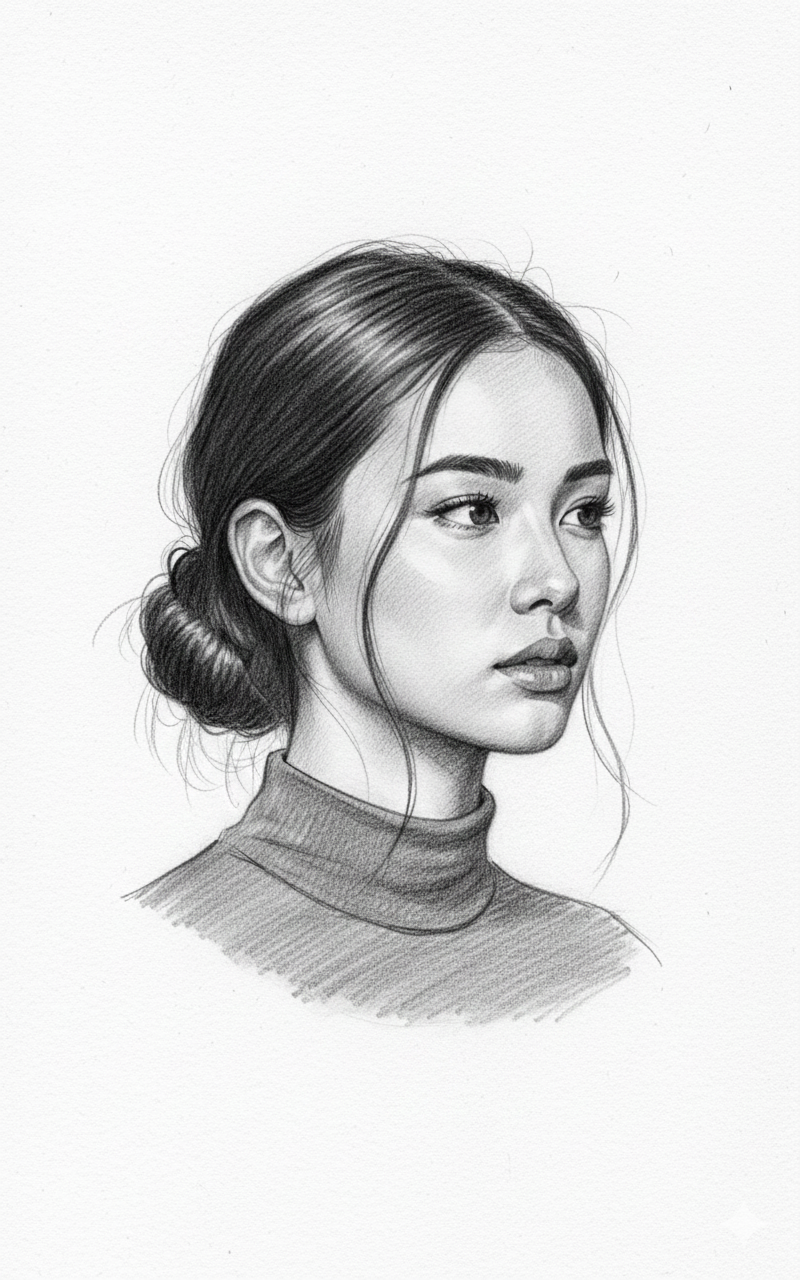
Graphite Pencil Sketch Portrait in Three Quarter View
About this prompt
This prompt turns your uploaded photo into a hyper-realistic pencil sketch. The woman is drawn in a three-quarter profile view with her hair tied back in a loose bun and wispy strands framing her face. Details are carefully rendered: thick natural eyebrows, expressive eyes with individual eyelashes, and soft charcoal shading along the cheekbones and neck. The lighting described in the prompt is soft and ambient, giving gentle tonal transitions, while high contrast between the dark hair and lighter skin tones adds depth. The whole drawing sits on a white paper background in a fine-art style with delicate linework, so it looks like a professional artist's study rather than a filter effect. It is a thoughtful option for a minimalist profile picture, a personalised gift print, a birthday or Teachers' Day card, or an art-themed social post. Students and hobby artists can also use the output as a reference for practising graphite shading techniques. Because the result is monochrome and paper-based, it works well printed in a frame or as a cover for a notebook or journal. Changing the pose description lets you create a matching set of sketches.
Lighting, colour and composition
Soft ambient light produces subtle tonal gradients rendered in graphite and charcoal. The palette is fully monochrome, from deep charcoal blacks to clean paper white. A three-quarter profile composition leaves negative space on the white page, letting the delicate linework of hair and face stand out.
Ways to make it your own
- Request a sepia or warm brown pencil tone for a vintage, hand-drawn look.
- Change the pose to a front-facing portrait if you want both eyes fully visible.
- Ask for visible pencil strokes at the edges to suggest an unfinished artist's sketch.
Best for
Girls photo ideas and creative portrait inspiration.
Suggested framing
Use 9:16 portrait framing as described in the prompt, or adapt to 4:5 for feed posts.
Customization ideas
Adjust the clothing, background, lighting, colors and composition to match your own idea.
How to use
Copy the prompt, adapt it to your idea, and paste it into your preferred compatible AI tool. Follow that tool’s instructions for reference photos.
A few helpful answers.
What type of image does this prompt create?
In a compatible AI tool, this prompt is intended as a starting point for this prompt turns your uploaded photo into a hyper-realistic pencil sketch. The woman is drawn in a three-quarter profile view with her hair tied back in a loose bun and wispy strands framing her face. Details are carefully rendered: thick natural eyebrows, expressive eyes with individual eyelashes, and soft charcoal shading along the cheekbones and neck. The lighting described in the prompt is soft and ambient, giving gentle tonal transitions, while high contrast between the dark hair and lighter skin tones adds depth. The whole drawing sits on a white paper background in a fine-art style with delicate linework, so it looks like a professional artist's study rather than a filter effect. It is a thoughtful option for a minimalist profile picture, a personalised gift print, a birthday or Teachers' Day card, or an art-themed social post. Students and hobby artists can also use the output as a reference for practising graphite shading techniques. Because the result is monochrome and paper-based, it works well printed in a frame or as a cover for a notebook or journal. Changing the pose description lets you create a matching set of sketches. Results depend on the tool, settings and references you use.
Can I customize the clothing or background?
Yes. Replace the clothing, setting or colors in the prompt with your own choices. Keep descriptions consistent and adjust one detail at a time.
What aspect ratio works best?
Start with Use 9:16 portrait framing as described in the prompt, or adapt to 4:5 for feed posts.. A 4:5 ratio works well for a portrait feed post. Adjust the crop for your intended platform and your tool’s available settings.
Does Prompt King generate the image?
No. Prompt King helps users discover and copy prompts that can be used with compatible AI tools.
Can I use this for social media ideas?
Yes. Use it as creative inspiration and customize the result for your audience. Use photos you have permission to upload, and check your chosen tool’s terms before publishing.