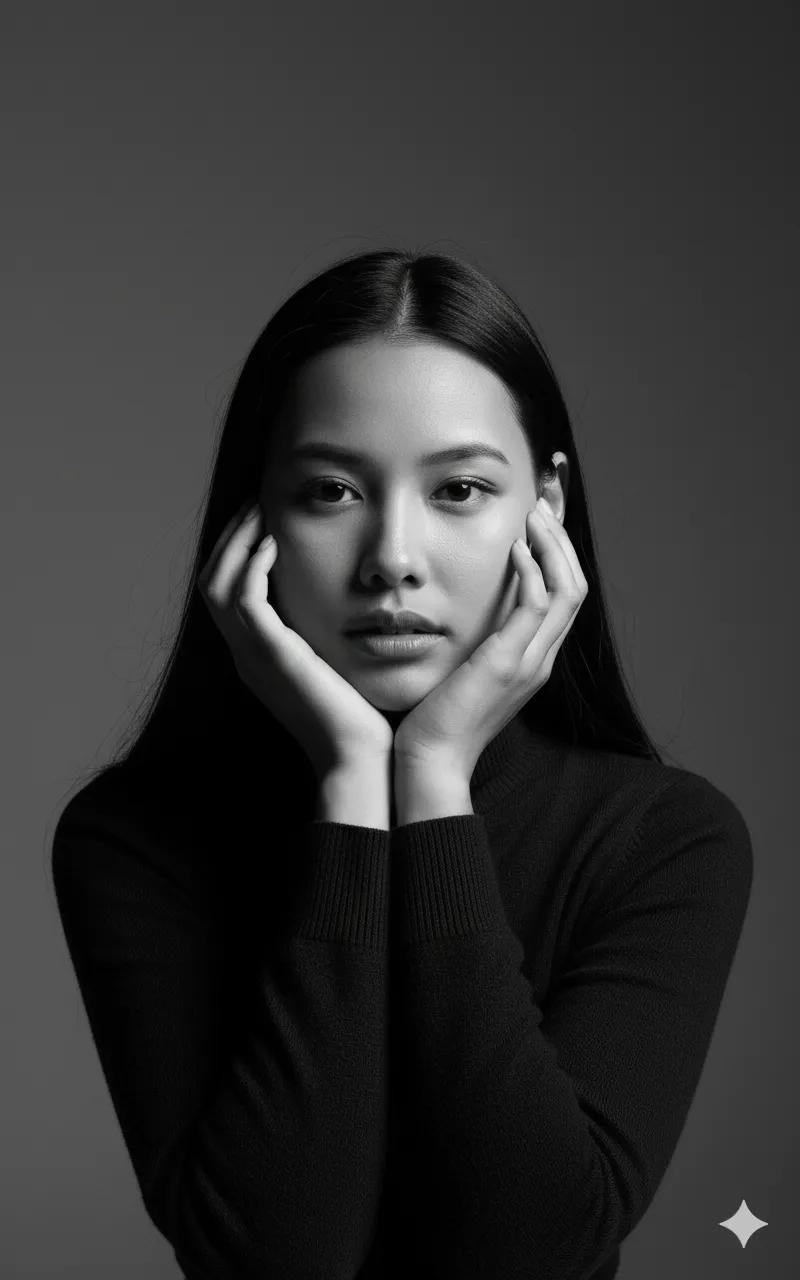
Chin on Palms Black and White Studio Portrait
About this prompt
This prompt creates a high-contrast black and white studio portrait of a young woman with long, straight dark hair. She poses with both hands gently framing her face, resting her chin on her palms, a classic and approachable portrait pose. She wears a dark, high-neck turtleneck that keeps the frame clean and focused on her expression. Lighting is in a chiaroscuro style but softer than a pure black backdrop: shadows define her cheekbones and facial structure against a solid medium-grey studio background. The aesthetic is minimalist, with sharp focus and an 85mm lens look that flatters facial proportions and slightly blurs the backdrop. Your uploaded image is used for the face. It suits professional profile pictures for LinkedIn or a resume, an author bio photo, a portfolio header, or a calm, timeless social media portrait. The grey background makes it more versatile than a pure black setup, because it pairs well with text and works on both light and dark interface themes. Anyone who wants a simple, studio-quality headshot without colour distractions will find this prompt reliable and easy to adapt.
Lighting, colour and composition
Soft-edged chiaroscuro lighting from one side models the cheekbones while the opposite side falls into gentle shadow. The palette is monochrome, with charcoal clothing and hair against a mid-grey backdrop. A close, centred composition uses the hands as a frame around the face, shot with an 85mm compression look.
Ways to make it your own
- Change the grey background to white for a brighter, high-key professional headshot.
- Ask for a slight smile to make the portrait friendlier for a work profile.
- Use a square 1:1 crop so the framed face fits neatly in profile circles.
Best for
Girls photo ideas and creative portrait inspiration.
Suggested framing
Use 9:16 portrait framing as described in the prompt, or adapt to 4:5 for feed posts.
Customization ideas
Adjust the clothing, background, lighting, colors and composition to match your own idea.
How to use
Copy the prompt, adapt it to your idea, and paste it into your preferred compatible AI tool. Follow that tool’s instructions for reference photos.
A few helpful answers.
What type of image does this prompt create?
In a compatible AI tool, this prompt is intended as a starting point for this prompt creates a high-contrast black and white studio portrait of a young woman with long, straight dark hair. She poses with both hands gently framing her face, resting her chin on her palms, a classic and approachable portrait pose. She wears a dark, high-neck turtleneck that keeps the frame clean and focused on her expression. Lighting is in a chiaroscuro style but softer than a pure black backdrop: shadows define her cheekbones and facial structure against a solid medium-grey studio background. The aesthetic is minimalist, with sharp focus and an 85mm lens look that flatters facial proportions and slightly blurs the backdrop. Your uploaded image is used for the face. It suits professional profile pictures for LinkedIn or a resume, an author bio photo, a portfolio header, or a calm, timeless social media portrait. The grey background makes it more versatile than a pure black setup, because it pairs well with text and works on both light and dark interface themes. Anyone who wants a simple, studio-quality headshot without colour distractions will find this prompt reliable and easy to adapt. Results depend on the tool, settings and references you use.
Can I customize the clothing or background?
Yes. Replace the clothing, setting or colors in the prompt with your own choices. Keep descriptions consistent and adjust one detail at a time.
What aspect ratio works best?
Start with Use 9:16 portrait framing as described in the prompt, or adapt to 4:5 for feed posts.. A 4:5 ratio works well for a portrait feed post. Adjust the crop for your intended platform and your tool’s available settings.
Does Prompt King generate the image?
No. Prompt King helps users discover and copy prompts that can be used with compatible AI tools.
Can I use this for social media ideas?
Yes. Use it as creative inspiration and customize the result for your audience. Use photos you have permission to upload, and check your chosen tool’s terms before publishing.